ABAP trial system for developers is available at least for 15-20 years in different formats like windows executable and aliases like MiniWAS. The version I started using long time ago was a standalone windows version, what we used on a dedicated PC for giving programming courses @ Technical University Budapest. As soon as virtualization and computing capacity evolved we could run it on VMware Player or Oracle VirtualBox locally at home. Linux containers are nowadays available to every windows user to run the SUSE Linux Enterprise Server (SLES) based ABAP Trial Systems on Docker at late night evenings .
Goal of the article
To provide a painless installation and connection guide on windows 11 using Docker Desktop and Windows Subsystem for Linux (WSL). Saving the time of reading the full documentation or watching YT videos were authors presenting themself instead of the valuable content what is written finally into the description section with unreadable format. Code and commands talks ! Documentations can be indexed and used by AI Agents with not too much effort, not like burning computing capacity and electricity to extract a step-by-step document from a video.
I frankly hate starting and stopping the playbacks, zooming on badly recorded desktops etc.
I think it is enough from the intro also…
Prerequisites
Windows 11
WSL version 2 installed: wsl --install --no-distribution Switching from WSL 1 to 2 is not part of this article
Resource to be provided: 32GB RAM, 170GB disk space, 4 CPU cores
WSL Configuration
After installation add a .wslconfig text file under your user folder like c:\Users\attila\.wslconfig This configuration is valid for all the linux distro instances you create, including the one docker desktop creates for itself. Reference: https://learn.microsoft.com/en-us/windows/wsl/wsl-config#wslconfig
Create the file manually or use a user terminal and paste the content:
notepad$env:USERPROFILE\.wslconfig
Adjust memory size and processor cores according to your computer capacities. This is the maximum resource value you allow the subsystem to allocate from your system resources.
Optional I always set the location of all docker related data files to a custom location, including the swapfile. This is not mandatory if you like %APPDATA% folder for the rest of your virtual disk files as well.
# Settings apply across all Linux distros running on WSL 2[wsl2]# Limits VM memory to use no more than 32 GB, this can be set as whole numbers using GB or MBmemory=32GB# Sets the VM to use four virtual processorsprocessors=4# Sets amount of swap storage space to 8GB, default is 25% of available RAMswap=16GB# Sets swapfile path location, default is %USERPROFILE%\AppData\Local\Temp\swap.vhdxswapfile=d:\\WSL2\\swap\\wsl-swap.vhdx# Turn on default connection to bind WSL 2 localhost to Windows localhostlocalhostforwarding=true# Disables nested virtualizationnestedVirtualization=true# Turns on output console showing contents of dmesg when opening a WSL 2 distro for debuggingdebugConsole=false# Enable experimental features[experimental]sparseVhd=true
Shut down WSL after config so that it picks up config at next startup.
Disable Resource Saver ! This fixes the common issue ABAP Instance dies, when you leave your computer alone which then switches to saver mode.
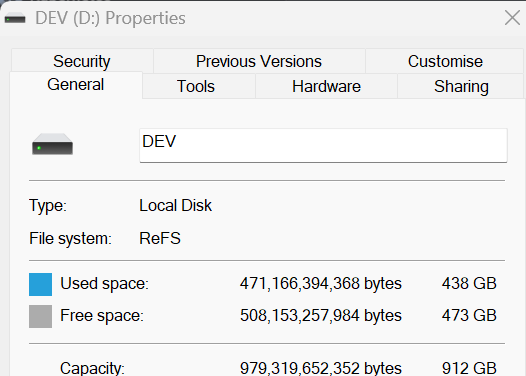
Optional Set Disk Image location, one hand if you – like me – does not like %AppData% folders or migrate often, on other hand I have a separate drive formatted to ReFS file system. ReFS gave me a performance boost. For that you need a Pro Workstation licence key.
Note: if you are running Docker Desktop with many containers already do not change Disk Image Location folder! It is rather good for fresh installs or when you really want to fight and cry migrating disk images of an existing setup – but you have not done it before, and you like to risk loosing your data without backup…
Pull the ABAP System image
Docker UI
XOR user terminal:
dockerpullsapse/abap-cloud-developer-trial:2025
Run the ABAP System
Now we have an image, but instead of quickly pressing the Run button and getting a docker container up and running with wrong settings ending in a useless system, we rather need specific run command options launching the instance for the first time. Here is the PowerShell script, what you can save with .ps1 extension, then open a PowerShell terminal and run it:
Running the next release you need to replace simply the image tag 2025 with the new one in the script.
To stop the system, press Ctrl + C in the PowerShell window.
Next time You need it, press the Start/Stop button in Docker UI under Containers.
Hint: open the Logs of the container (click a4h) to check the startup or shutdown process status.
Note: there is no need for dedicated graceful shutdown command or script. Upon setting up the container with the --stop-timeout, that becomes a static container property.
Add host file entries
We’ll become time travellers in this step . Add a new record to the windows hosts file with admin privileges adding the AS instance host names.
Create New user specified system entry in SAP Logon without checking SNC/SSO checkbox on Network tab.
You can log on immediately without further config to use SAP GUI.
TLS Certificate Installation
In case you want secure HTTPS connections to connect VSCode, Fiori Tools etc., and you see we mention A4H.wdf.sap.corp, you need this. For simple ABAP Development in ADT Eclipse or a SAP GUI connection this is not required.
To save headaches during https connections setup, nodejs certification issues via Fiori Tools, logging on to FLP etc. trusted certificates are required.
In the current state when you launch the A4H system in the browser, it has a certificate loaded. The authority certificates issuing the A4H certificate are although not present in your windows system and comes not automatically due it is a custom SAP one.
Launch transaction STRUST and export the below 2 certificates in Binary format:
SAP Global Root CA
SAPNetCA_G2
Double click and ensure you entered the correct filename each time on save, do not mix up the certificate names.
After successful export double click the .cer file to open, then choose to Install Certificate… possibly in Local Machine scope.
SAP Global Root CA.cer must go to Trusted Root Certification Authorities
SAPNetCA_G2.cer must go to Intermediate Certification Authorities.
After that launch the system securely via the certified server name w/o errors or warnings.
We can trick this . There is a soft way for that using a customizing, w/o touching the system profile.
Do this in case You completed the previous TLS certificate installation step and want to launch applications via HTTPS using the secure domain A4H.
Although we are not using Web Dispatcher we can use transaction HTTPURLLOC
The above entry ensures the resource URLs are rewritten for HTTPS protocol with the proper domain name for web applications. So transactions like /UI2/FLP for instance launch by A4H domain URL securely without warnings from now on, at:
HANA started onPremise and not as HANA Cloud, and you can still access HANA DB from Eclipse and create nice calculation views. You are not restricted to ABAP CDS table functions or ABAP Managed Database Procedures in classes.
After installing HANA Studio, open the HANA Development Perspective.
Window > Perspective > Open Perspective > Other
Add System…
Host: vhcala4hci:30215
Instance: 02
Tenant DB Name: HDB
DB User: SAPA4H
Password for image 2025: ABAPtr2025#SP00
This is not HANA Cloud, that is sold as a separate product and service on BTP where you execute development in HANA WebIDE not Eclipse (or some artefacts also doable in BAS in connection to your CAP project for example).
History: The HANA database interface of ABAP AS was initially slower than the good old one supportin multiple DB providers . See where stealing in memory ideas and ordering the first huge memory cluster lead SAP.
ABAP WebDynpro & Floorplan Manager
ABAP WebDynpro and FPM requires several services to be activated. Save the pain to do it manually, here is an alternative admin report: RSICF_SERVICE_ACTIVATION. Select ABAP and FPM related ICF service collection for activation. You’ll find here some other useful options as well for the future.
Almost done, also activate manually the ICF logon service: /default_host/sap/public/bc/icf/systemloginjs in transaction SICF:
Fasten seatbelt, some consultants still need it to expose legacy ALV in S/4HANA
Utilize again RSICF_SERVICE_ACTIVATION (see above), and run it with WEBGUI collection.
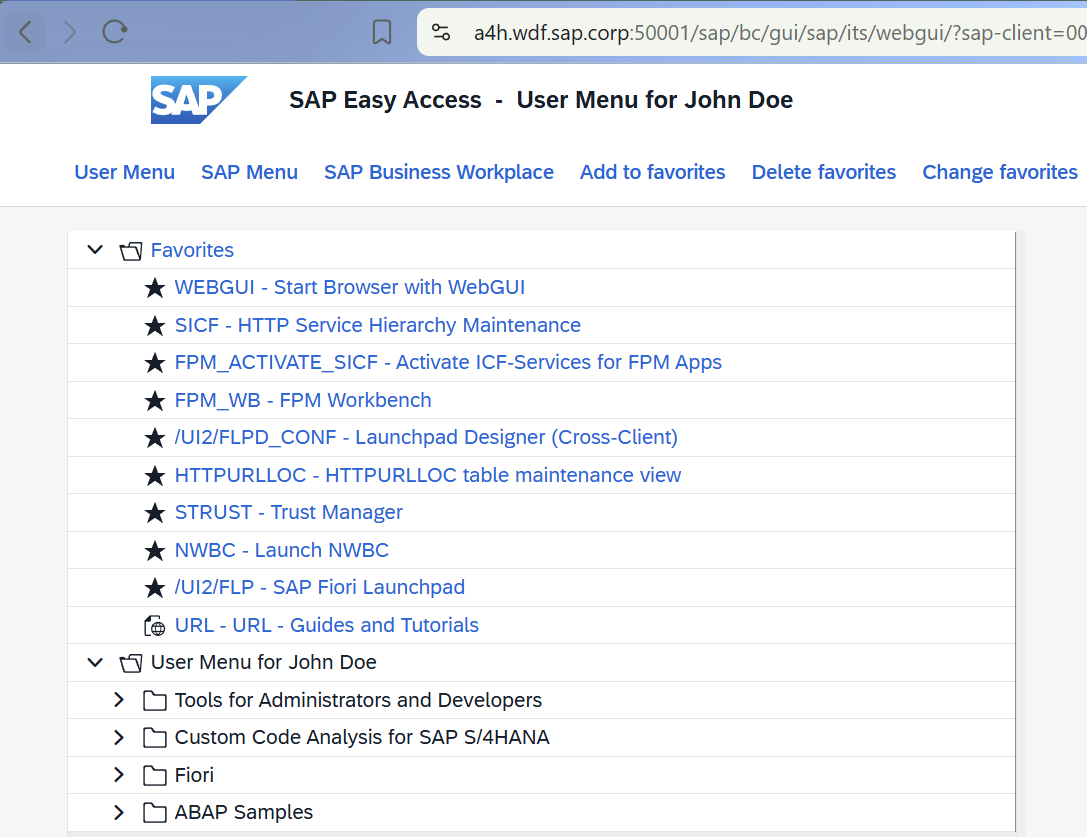
Then start transaction: WEBGUI.
Amazing right ?!
Fiori Tools
Whenever you want to develop Fiori applications or extensions in connection to an ABAP system, browse available OData services, entities or their data, a system connection is the way to go.
Prerequisites:
VSCode
Node.js
VSCode Extension: SAP Fiori Tools – Extension Pack
Run Command (Ctrl + Shift + P): SAP Fiori: Focus on SAP Systems View
Launch Connection Manager and add new.
Use this URL having no certificate errors due we’ve made our homework in step TLS Certificate Installation: https://a4h.wdf.sap.corp:50001/
Test Connection and be patient due the system is compiling on first access. Save.
You can create a Fiori application already and run it. You got a new option at the bottom of the connection, but this is just one way to launch the Application Generator…
Completing the Fiori Tools template generation steps your development environment is ready to run the application with live data.
Swagger UI
Why not to test and analyse a Web API with some queries before using it in a CAP application for example. Open a Service binding in Eclipse ADT then press Test…
Practice CAP development with live ABAP System connection and data. One of the most common development scenario is to access variety of remote services/protocols from your CAP service. CAP protocol adapters for CDS are the majestic way to do that. You can do that without BTP locally.
As result you get a package.json in your workspace, otherwise the Add to CAP Project button is not visible in Service Center. You have it, You push it !
Enter the password of DEVELOPER:
Run your CAP service with command cds watch --profile live
Decades ago there was a global initiative at SAP internally to build SOAP services for existing applications. We produced may of them. Service Oriented Architecture was new those times, and we could not see were the world will evolve from GUI and Java WebDynpro, yes Java WebDynpro, you heard it well . After Oracle eat Java, SAP got rid of the Java stack completely except Adobe runtime. Nowadays there are still receivers which wait SAP to post them a SOAP Envelope. Nothing was easier than exposing an RFC enabled function module as a SOAP service.
Testing is also possible in Trial, you just need to ignite the system. We describe here the way to do it.
Utilize again report RSICF_SERVICE_ACTIVATION (see above), and run it with SRT.
Activate service APPL_SOAP_MANAGEMENT in transaction SICF.
Launch transaction SOAMANAGER, and choose Simplified Web Service Configuration
Search for WS_GET_T000_ENTRY service, and tick Basic Authentication for FLIGHTBOOKINGORDERCANCEL then Save. After that the SOAP Service becomes active and you get access to a live WSDL URL.
Download/Save the wsdl file as ws_get_t000_entry.wsdl.
Open SoapUI, create a new SOAP Project and Browse the WSDL file:
Add Basic auth and use DEVELOPER user with its password.
Run
As you can see, you have the SAP clients listed, the SOAP service returned results in the response
Connect BTP / BAS / Build Code via SAP Cloud Connector
Our time travel is approaching now. Todays natural demand is creating Fiori Adaptation projects or developing side-by-side extensions, where you also want to fetch data in Business Application Studio on BTP from the good old, but modernized ABAP Netweaver system. Many developer wants to practice this development scenario.
In case you have access to a BTP Subaccount as admin and to Business Application Studio, you do not need to register a BTP Trial account for free, simply skip. Although we describe the steps of setting up a BTP Trial account as well.
Start Cloud Connector
BTP ABAP Environment Trial <> ABAP Cloud Developer Trial in terms of freedom, so you might want to connect your local ABAP Trial instance to a BTP subaccount, and access it via a BTP subaccount level destination. You might want practice a CAP side-by-side extension prototyping on BTP etc. The way to do it is using the Cloud Connector. To get the Cloud Connector (a reverse proxy) up and running here are the scripts needed:
docker exec -it a4h bash /usr/local/sbin/rcscc_daemon status
Alternatively all commands can be issued in Docker Desktop directly:
Note: to practice CAP development locally in VSCode connecting to ABAP Developer Trial instance on Docker, the Cloud Connector is not required actually. Simply use basic authentication with the developer user and password in your local CAP project to fetch data from your ABAP Developer Trial.
One of the main pain points in CAP development is the deployment and using those BTP service instances, but that you can practice on BTP only.
Navigate to Cloud Connectors and Download Authentication Data
Add Cloud subaccount to On-Premise connection
Go back to the running cloud connector and define an On-Premises to Cloud Subaccount
Choose the authentication data file downloaded from your BTP Trial Account
Enable Auto Renewal.
Half of the connection configuration is done, between Cloud connector and BTP.
We need to let the BTP applications access our on-premise Trial System running on Docker, so we need to add a Cloud to On-Premise connection.
Parameters:
Protocol: HTTP
Internal Host: vhcala4hci
Internal Port: 50000
Virtual Host (free choice, my was): skynetvsdeathstar
Virtual Port (free choice, my was): 443
Allow Principal Propagation: no
Host in Request Header: Use Virtual Host
System ID: A4H
When talking about security and resource exposure we can consider the Trial as an “I do not care” system. So simply use / as URL Path and Access Policy Path and All Sub-Paths when adding resources. And this is all what you need. All services are accessible on BTP. Otherwise expose only the needed SICF paths selectively. Good luck !
Create BTP Destination
Jump back to our BTP Trial account and first confirm that A4H system is accessible via CC. You will see the Virtual Host and Port you defined and the available resources.
Add a subaccount level BTP Destination pointing to the virtual system. This destination can be used in Business Application Studio for example in your Fiori or CAP application.
Connectivity > Destinations > Create / From Scratch
Parameters:
Name (free choice, my was): skynetvsdeathstar
Type: HTTP
Authentication: Basic
User: DEVELOPER
Password for image 2025: ABAPtr2025#SP00
Proxy Type: OnPremise
URL is the Virtual Host Name and Protocol, my was: http://skynetvsdeathstar:443
Additional properties
WebIDEUsage: odata_abap,dev_abap
WebIDEEnabled: true
HTML5.DynamicDestination: true
sap-client: 001
HTML5.Timeout: 60000
HandleRedirects: true
Check connection:
Use Destination in BAS
In your BTP Trial account, subscribe for SAP Build Code using the configuration Booster.
Open Business Application Studio
Create a Dev Space Fiori / CAP development
File > New Project from Template > SAP Fiori generator > List Report
Connect your local ABAP Trial system running on Docker via the BTP destination we previously defined.
Completing the Fiori Tools template generation steps your development environment is ready to run the application with live data.
ABAPGit
You can transfer your developments to the next ABAP Cloud Developer Trial version using a git repository, or download/upload it as zip in offline mode. We describe here the online mode using github.com. The trial instance comes with ABAPGit utility preinstalled including the github.com certificates in transaction STRUST, thanks Trial Team! ABAPGit will convert and push your development objects to GitHub.
Prerequisites:
github.com repository with an existing file in the repository like readme.md
valid personal access token (password) generated at github.com with eligible scope (not part of this article)
Run report ZABAPGIT_STANDALONE then Create New Online Repository. Select your local package you worked in, and enter your Git Repository URL.
Press Create Online Repo and enter your GitHub.com username (you’ll find it in top right avatar menu at github.com ) and the personal access token (password) you previously generated.
Press Stage > Add All and Commit. This will register your objects for upload.
Add a Commit message, what normally describes your incremental changes to the codebase, + an eMail address.
Press Commit.
Your package contents are available on github.com serialized to text.
Update Expired Licence
Log in to client 000, with user: SAP*, password for image 2025: ABAPtr2025#SP00
Start transaction SLICENSE and copy your Hardware Key
Simply removing previous image and container version of ABAP Trial from the Docker Desktop UI is not sufficient in case you want to get back some disk space. The virtual disk file is continuously extended in the background to fit in every new image and container. If you like to get back hundreds of gigabytes, you need to act yourself.
Quit Docker Desktop from its system-tray menu. Then open PowerShell as Administrator and run: wsl --shutdown. Optionally confirm that distributions are no longer running: wsl --list -v.
Find the backing VHDX. Docker Desktop locations differ by version and may be customized in Settings → Resources → Advanced →Disk image location. We made this setting, so for us it is easy to locate.
Having the path in hand execute VHD optimization.
Optimize-VHD -Path "d:\Docker\image\DockerDesktopWSL\disk\docker_data.vhdx" -Mode Full
Start Docker Desktop manually.
Closing Notes
After 20 years, on-premise (private cloud) ABAP systems still rock. Why ? There are more facts to that, like customers were pushed toward BTP solutions unsuccessfully by SAP. Who the hell can simply upgrade legacy code to clean core extensions transforming 20 years of custom code within the confines of an upgrade project ? That is not an upgrade, that is in fact a reimplementation. SAP caused lot of headaches to customers, who actually blamed many times consultancy companies failing to deliver migration which was already determined to fail at start, when no replacement API is provided. Doubling the cheap offshore resources understanding nothing from customer business processes and custom code is senseless. So pushing towards S/4HANA Public Cloud was a nice imagination, an imagination only. Target group is today still very restricted, and rather fits midsize market, due in may cases a simple value help cannot be provided due restrictions. SAP says use my software, to win against the competitors, but the reality was that successful companies have baked their unique business processes into exits what made them leaders on global market. How would / could / want those companies shift to clean core without having the possibility to reimplement the same successful processes because there is not clean core API available for that ? If they can’t do that they will be on same restricted level of business process like the others using S/4HANA, so where is actually the plus what using SAP software brings as benefit ? Companies spend budget on new license, reimplementation and have finally a less capable system. Side-by-side will not solve everything, and also you pay the cost of integration and secondary infrastructure for internally accessed features and processes now hosted on a separate platform. So SAP acknowledged finally the “the technical dept” they call it needs a decade to eliminate, it means legacy code made clean core, and of course when public replacement APIs will be available if at all. So SAP find out the transition without providing released replacement APIs…, then until they do their job, you have to wrap legacy code to have another level of maintenance cost in the middle and things like that. Insane….
So yes on-premise ( private cloud ) ABAP system still rocks. We’ll see how long , there was a dark time….when many people started the annoyingly stupid posts with title “Is ABAP Dead”. I could burn LinkedIn when seeing such post for the 100th time… Of course the wide palette of programming languages available on Cloud platform was spreading and satisfying with the many open source node modules delivering rich creative features and capabilities, which was not provided by the Netweaver platform and ABAP language itself. So of course BTP ABAP Environment (Steampunk) kicked in, then in embedded mode to S/4HANA Public Cloud. Okay, then ABAP is not dead…, but not because BTP ABAP Environment, what has no right to live next to a private cloud system, simply in most of the cases is senseless. Also every smart and AI based solution is not supported by Netweaver at the moment. What S/4HANA can provide is the list of valuable Remote Public APIs with the decent business process best practices implemented by transactional applications. Data access for smart AI solutions with best performance and functionality need a separate and fast data store with good libraries and capabilities for AI solutions. So instead of calling separate tens of S/4HANA OData services subsequently for read only access might not be a best practice on high data volumes.